Beast Mode StimulusReflex with AllFutures
Building a reactive, server-rendered faceted search UI in Rails with StimulusReflex #
I’m going to show you how to use StimulusReflex and AllFutures to build faceted UIs in Rails with startling ease.
We’re going to step through the creation of an interface for filtering, sorting and paginating tabular data. I call it… 👉 Beast Mode StimulusReflex 👈.
Beast Mode is literally a Single Page Application; it has one page that displays Customer records in a table. The current demo runs on Rails 8.1, Ruby 3.4, public StimulusReflex 3.5.5 / CableReady 5.0.6, and AllFutures 2.0 — Stimulus only, no Turbo.
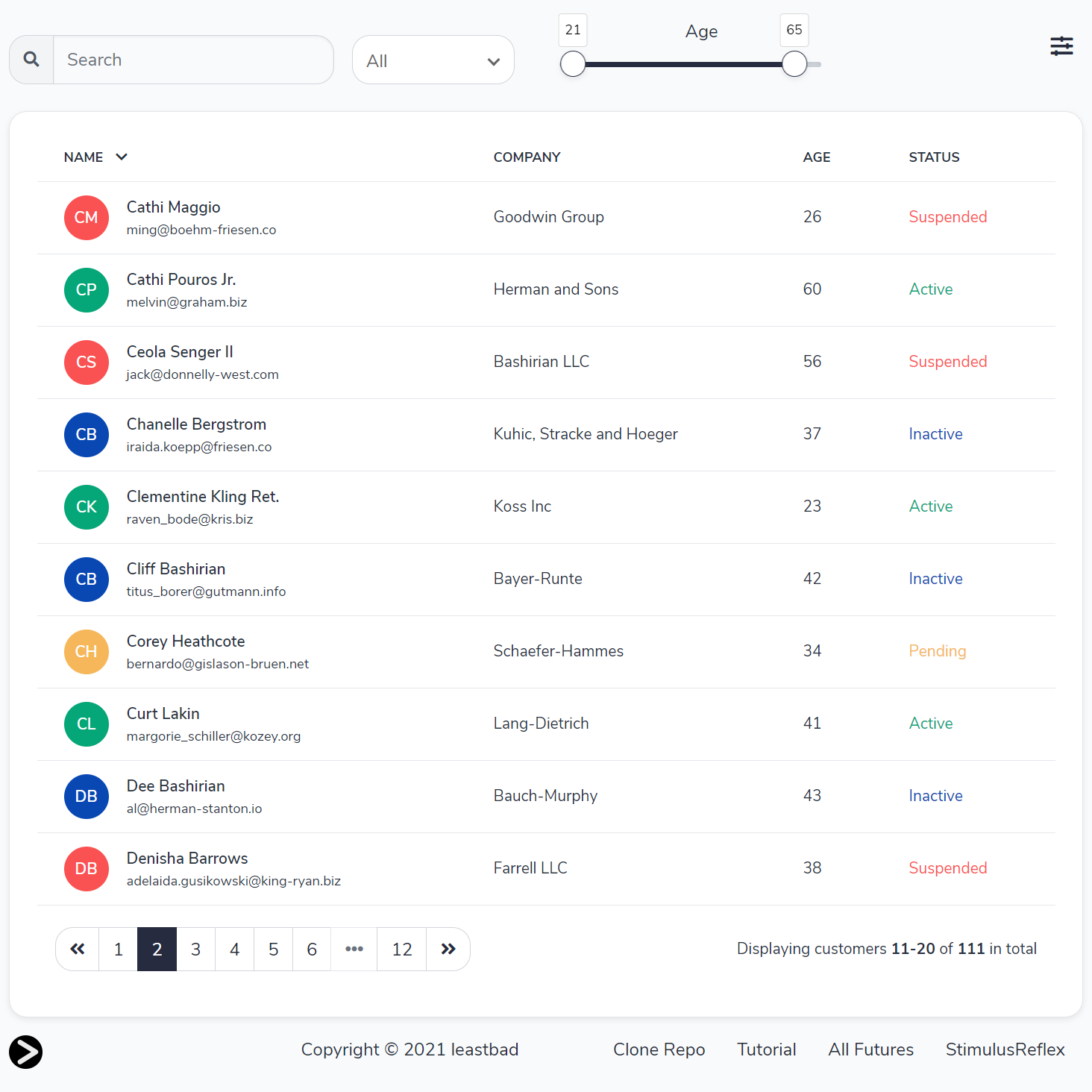
I recommend that you open the app in a separate tab and clone the code so that you can follow along.
The Customer model #
Beast Mode displays Customer records in a table. Each Customer has five attributes:
- name
- company
- age
- status
The Faker gem is used in seed.rb to populate the customers table with some sample data.
Faceted search is just a fancy way of saying that you start with every possibility, and then add constraints until you’re only left with what you’re looking for. If you’ve ever checked a box that implies “Only show results with Amazon Prime available”, you’ve used a faceted search.
Our users will be able to interrogate Customer data with a variety of filters:
- a text search that can either be really strict or forgiving of spelling mistakes; it will search all attributes, but give priority to names
- display customers that match a specific
statussuch as “Active” - show customers who work at law firms, based on the presence of the word “and” in their
company - display customers in a particular
agerange
Filters are additive, and it doesn’t matter which order you apply them. Filters can be implemented as Rails scopes in the Customer model:
class Customer < ApplicationRecord
  include PgSearch::Model
  pg_search_scope :stemmed, ->(query, threshold) {
    {
      query: query,
      against: {name: "A", email: "B", company: "B", age: "B", status: "C"},
      using: {
        tsearch: {prefix: true},
        trigram: {threshold: threshold, only: [:name]}
      }
    }
  }
  scope :search_for, ->(query, threshold) { stemmed(query, threshold) if query.present? }
  scope :with_status, ->(status) { where(status: status) if status.present? }
  scope :only_lawyers, ->(lawyers) { where("company like ?", "% and %") if lawyers }
  scope :between, ->(low, high) { where(age: low..high) }
end
We make use of the excellent pg_search gem to create a scope called stemmed that will search for text matches (giving preference to name) with a variable threshold for error; 0.1 is quite forgiving while 0.3 is roughly “high school English teacher” strict (the UI labels that toggle Uptight). Due to a quirk in the way pg_search scopes work, searching for "" returns no results instead of all results, forcing us to create an inelegant search_for scope which only calls stemmed if there is a non-empty value to search for.
The three remaining scopes are standard Rails where clause modifiers. We always check to verify that a value has been set or else we don’t add that scope to the query; the between scope is always called, eliminating the need for an if statement.
Introducing: AllFutures #
We’ll use StimulusReflex to make short work of the reactive functionality, while AllFutures can remember which filters we’ve activated across multiple user actions. We’ll call this the “search instance” for the rest of this post.
We need continuity for our search instance, at least for as long as it’s on our screen. If we hit refresh or navigate away and come back, the old instance is gone and we should see a brand new search instance, with the UI restored to its default state.
AllFutures offers Rails developers a way to gather attributes on an ephemeral, Redis-backed model across multiple requests. This solves a huge logistics problem. Rails’ ActionDispatch is based on a request/response cycle, so there’s no built-in provision for a model that might be valid soon… but isn’t yet.
Even if ActiveRecord did know how to persist invalid records, storing the parameters of search instances in a searches table is an awkward solution at best, even though many developers have done exactly this over the years.
The worst part is that 1000 developers will solve the search instance problem in 1000 slightly different ways.
This has led to countless hacks: modifying the query string, abusing the session object, and scheduled tasks to clear out searches in the middle of the night. Remember: it’s a law of nature that all temporary record clearing tasks eventually stop working shortly after the developer who wrote them leaves the company.

AllFutures classes are similar to ActiveModel::Model, but with attributes support. However, instead of persisting to your SQL datastore if they are valid, AllFutures instances are stored regardless of their validity.
Redis storage is fast, cheap and ephemeral; depending on your cache expiration policy, the keys you create will eventually be retired to make room for new ones.
Behind the scenes, AllFutures 2.0 uses Kredis and a vendored Active Entity layer (you do not add activeentity as a separate app gem). Persistence is explicit: create / find / mutate attributes / save.
CustomerFilter #
AllFutures classes look just like ActiveRecord models, except that you define your attributes in the class. They can also contain the standard ActiveRecord Model features like validations and errors, instance methods, associations, attribute arrays, defaults and dirty checking.
You can put AllFutures model classes in your app/models folder, or create dedicated folders if your application will have multiple classes for different use cases.
For the Beast Mode application, we create attributes to hold all of the information associated with a search instance. These attributes correspond to the state of the UI elements, as well as pagination, the sort order and direction.
Representing a search instance as a collection of attributes might require a shift in thinking. We’re used to being focused on the results of a search, not the data which defines the search itself.
You can see how the default values assigned to the attributes directly map to the default state of controls in the faceted search UI:
# app/models/customer_filter.rb
class CustomerFilter < AllFutures::Base
  # Facets
  attribute :search, :string
  attribute :threshold, :float, default: 0.1
  attribute :status, :string
  attribute :lawyers, :boolean, default: false
  attribute :low, :integer, default: 21
  attribute :high, :integer, default: 65

  # Pagination
  attribute :items, :integer, default: 10
  attribute :page, :integer, default: 1

  # Sorting
  attribute :order, :string, default: "name"
  attribute :direction, :string, default: "asc"

  def scope
    Customer
      .with_status(status)
      .only_lawyers(lawyers)
      .between(low, high)
      .order(order => direction)
      .search_for(search, threshold)
  end
end
There is also an instance method called scope, which returns an ActiveRecord::Relation. This is a lazy-loaded query that won’t run until it’s evaluated.
The goal is to keep the business logic associated with each search instance inside of the AllFutures class, similar to how you structure your ActiveRecord models.
Connect the dots #
In order to put our CustomerFilter to work, we’re going to need a CustomersController and matching views. Finally, we’ll connect the dots with a CustomersReflex.
class CustomersController < ApplicationController
  def index
    @filter = CustomerFilter.create
    @pagy, @customers = pagy(@filter.scope, limit: @filter.items)
  end
end
Before we can hand the keys over to StimulusReflex, we need three instance variables to render and serve the search UI page in its default state.
We need to create @filter, an instance of CustomerFilter. It represents this specific search session for however long this page is open. We can then call the scope method on @filter and pass the ActiveRecord Relation it returns right into Pagy.
Pagy rewards us with @pagy and @customers — giving us the default results and a reference to the Pagy object — which lets us navigate through them. (In Pagy 9+, the page size keyword is limit:, not items:.)
I don’t think it makes sense to forensically analyze the views; Beast Mode makes use of Bootstrap 5, FontAwesome and Stimulus as well as StimulusReflex. JavaScript is bundled with esbuild. Here is a simplified snippet from the ERB template used to construct the Search text box and the Status dropdown:
<input type="text" data-reflex="input->Customers#search" data-filter="<%= filter.id %>" />

<select data-reflex="change->Customers#status" data-filter="<%= filter.id %>">
  <option selected value="">All</option>
  <option value="Active">Active</option>
  <option value="Inactive">Inactive</option>
  <option value="Pending">Pending</option>
  <option value="Suspended">Suspended</option>
</select>
The key detail here is the use of the data-filter="<%= filter.id %>" on every element relevant to the search parameters. The filter’s id allows us to obtain a reference to the correct CustomerFilter instance inside our Reflex actions. When you initiate a Reflex, all attributes on the element are automatically passed to the server and made available via the element accessor.
CustomersReflex is the rug that ties the room together. Here’s a meaningful sample extracted from the main event:
class CustomersReflex < ApplicationReflex
  def paginate
    facet do |filter|
      filter.page = element.dataset.page
    end
  end

  def search
    facet do |filter|
      filter.search = element.value
    end
  end

  def status
    facet do |filter|
      filter.status = element.value
    end
  end

  def sort
    facet do |filter|
      filter.order = element.dataset.order
      filter.direction = element.dataset.direction
    end
  end

  private

  def facet
    filter = CustomerFilter.find(element.dataset.filter)
    yield filter
    filter.save
    pagy, customers = pagy(filter.scope, page: filter.page, limit: filter.items)
    # Wrap rows in a real <tbody>. StimulusReflex's `morph customers` helper wraps
    # the collection in a <div>; HTML5 parsing then strips <tr>/<td>.
    rows = render(partial: "customers/customer", collection: customers, as: :customer)
    morph "#customers", %(<tbody id="customers">#{rows}</tbody>)
    morph "#paginator", render(partial: "customers/paginator", locals: {pagy: pagy, filter: filter})
  end
end
Every user interaction triggers a Reflex action which uses the filter id to retrieve the correct CustomerFilter, updates the appropriate attributes depending on which action was taken, calls save, and then passes the updated CustomerFilter scope into Pagy.
Now we take the filter, pagy and customers variables and use them to morph two HTML fragments: the current results, and the pagination controls. Both reflect the current state of the search instance, thanks to the CustomerFilter.
StimulusReflex can also accept an ActiveRecord Relation via morph customers when the DOM id matches (#customers) and the partial convention lines up — but for table body rows, prefer an explicit <tbody id="customers">…</tbody> wrapper. Otherwise the HTML5 fragment parser treats the temporary <div> wrapper as body context and discards the table tags, collapsing columns in the UI.
This Reflex-powered code path resembles a video game run loop more than a traditional Rails ActionDispatch request/response cycle: selector morphs skip the router and ActionController, so round-trips stay small when Redis and Postgres are local.
That’s a wrap! #
It’s still surprising how much reactive, server-rendered UI you can get from a thin Rails app, StimulusReflex, and AllFutures 2.0 — and this demo barely scratches CableReady’s surface.
Beast Mode is a working reference you can clone, run, and steal from. If you’re evaluating reactive Rails patterns in 2026, start there and see how far a single page and a Redis-backed filter model will take you.
Did they meet at the gym?